
You built your funnel, grew your email list, and created valuable emails. But when you hit send, your messages end up in the spam folder instead of reaching your subscribers.
If your Systeme.io emails going to spam?, you’re not alone. The problem is usually not Systeme.io — it’s your email setup, sender reputation, or deliverability strategy.
In this guide, you’ll learn 12 proven fixes to improve your Systeme.io email deliverability, reach the inbox more consistently, and make sure your emails get the attention they deserve.
The Real Reason Systeme.io Emails Never Reach the Inbox (And How to Escape Spam Forever)
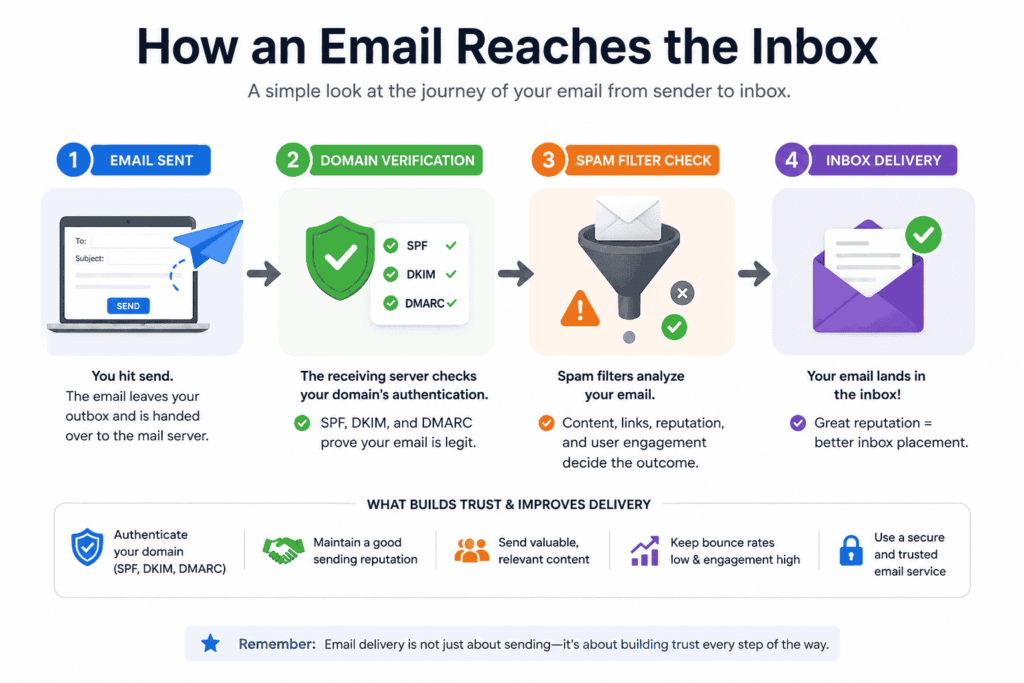
If your Systeme.io emails are going to the spam folder, the problem usually isn’t the platform itself. Instead, it comes down to how email providers like Gmail, Outlook, and Yahoo evaluate every email before deciding whether it belongs in the inbox or the spam folder.
Here are the four key signals they evaluate:
- Sender reputation: Is your sending domain trusted, or does it have a history that looks suspicious?
- Subscriber engagement: Do people open, click, reply to, or forward your emails—or do they ignore them or mark them as spam?
- Email content: Does your message provide genuine value, or does it look overly promotional or misleading?
- Technical setup: Have you properly authenticated your domain using SPF, DKIM, and DMARC so email providers can verify you’re a legitimate sender?
When enough signals say “suspicious,” your Systeme.io emails get routed to spam—even if your content is solid.
This guide shows you exactly how to flip those signals in your favor.
Fix #1: Stop Sending from a Free Email Address—Switch to a Professional Domain in 10 Minutes
If you’re sending emails from an address like yourname@gmail.com or yourname@yahoo.com through Systeme.io, you’re making it harder for your emails to reach the inbox. While these free email services are perfectly fine for personal use, they’re not the best choice for business email marketing. Because they’re commonly abused by spammers, email providers often apply stricter filtering to messages sent from free domains.
The easiest way to improve your Systeme.io email deliverability is to send emails from a professional, branded domain. A custom domain helps build trust with both your subscribers and email providers like Gmail, Outlook, and Yahoo. It also makes your business look more credible and professional.
What to do instead
Follow these simple steps:
- Register a custom domain such as yourbrand.com or yourhustlename.com.
- Create a branded email address like hello@yourdomain.com, support@yourdomain.com, or you@yourdomain.com.
- Connect your custom domain as your sending email inside Systeme.io’s email settings.
- Verify your domain by completing the authentication steps (SPF, DKIM, and DMARC), which we’ll cover in the next section.
A custom domain tells email providers: “This is a real business, not a random free account.”
Fix #2: Prove You’re a Trusted Sender—Set Up SPF, DKIM, and DMARC
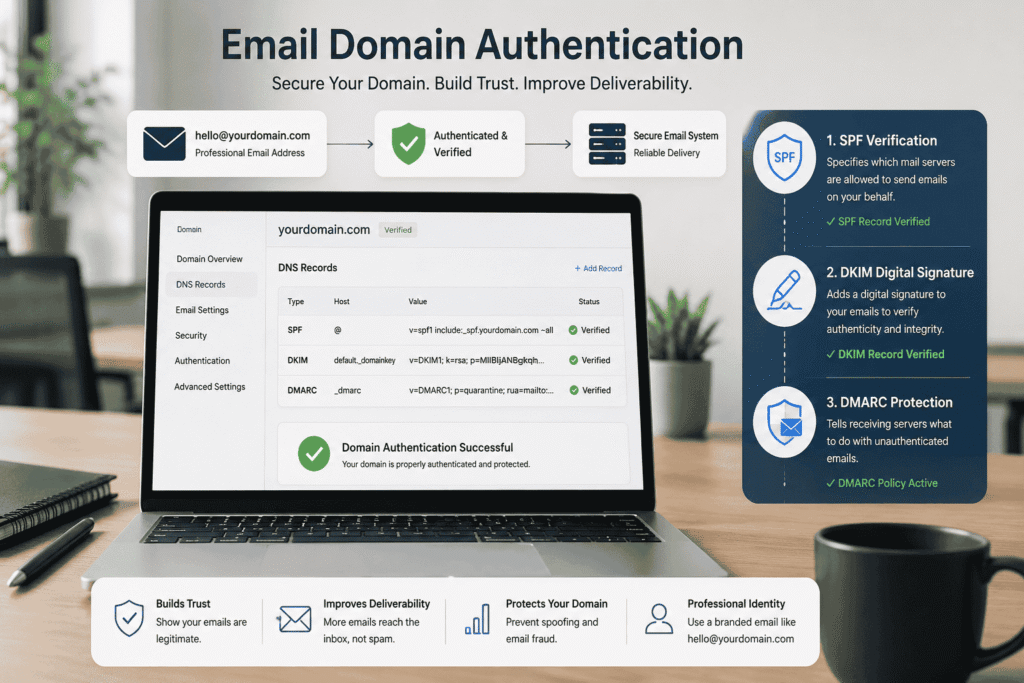
After connecting a custom domain, the next step is to authenticate it. If you’re trying to fix Systeme.io emails going to the spam folder, this is one of the most important changes you can make. While SPF, DKIM, and DMARC may sound technical, they’re simply security records that help email providers verify that your emails are legitimate.
Think of them as a digital ID card for your domain. They tell Gmail, Outlook, Yahoo, and other email providers, “Yes, Systeme.io is authorized to send emails on behalf of this domain.” Without these records, even genuine emails can appear suspicious, making it much more likely they’ll end up in the spam folder instead of the inbox.
What do SPF, DKIM, and DMARC actually do?
Here’s a simple explanation:
- SPF (Sender Policy Framework): Tells email providers which servers are allowed to send emails using your domain.
- DKIM (DomainKeys Identified Mail): Adds a digital signature to your emails, proving they haven’t been altered during delivery.
- DMARC (Domain-based Message Authentication, Reporting, and Conformance): Tells email providers what to do if an email fails the SPF or DKIM verification checks, helping protect your domain from spoofing and phishing.
Together, these three authentication methods build trust with inbox providers and significantly improve your Systeme.io email deliverability.
How to set up domain authentication
Follow these steps to authenticate your domain:
- Log in to your domain provider (such as Namecheap, GoDaddy, Cloudflare, or Hostinger).
- Add the SPF, DKIM, and DMARC DNS records provided by Systeme.io.
- Return to Systeme.io and set your custom domain as your verified sending domain.
- Send a test email to yourself using Gmail or Outlook, and if possible, ask a friend to check whether the email arrives in the inbox instead of the spam folder.
Fix #3: Warm Up Your Sender Reputation So Gmail Starts Trusting You Again
Your sender reputation plays a major role in whether your emails reach the inbox or end up in the spam folder. If you’ve just connected a new domain and immediately send hundreds or even thousands of emails, email providers may see that as suspicious behavior. To Gmail, a brand-new domain with no sending history that suddenly sends a large number of emails looks very similar to how spammers operate.
That’s why warming up your domain is so important. Instead of sending to your entire email list on day one, gradually build trust by sending emails to your most engaged subscribers first. As they open, click, and reply to your emails, you create positive engagement signals that improve your Systeme.io email deliverability and help establish a strong sender reputation.
What does warming up your domain mean?
A proper warm-up strategy includes:
- Sending emails to your most active and engaged subscribers first.
- Gradually increasing your sending volume over the next one to two weeks.
- Monitoring open rates, click rates, and replies to ensure subscribers are interacting with your emails.
- Maintaining a consistent sending schedule instead of sending large, unpredictable campaigns.
A simple 2-week warm-up plan
If you’re using a new domain, here’s an easy plan to follow:
Days 1–3
- Send emails to your 50–100 most engaged subscribers.
- Focus on providing helpful content rather than promotional offers.
- Monitor your open and click rates.
Days 4–7
- Increase your audience to around 200–300 subscribers if your engagement remains healthy.
- Continue sending valuable, relevant emails that encourage replies and clicks.
Week 2 and beyond
- Gradually expand your campaigns to include the rest of your email list.
- Keep your sending schedule consistent and continue delivering content your audience wants to receive.
Fix #4: Delete the Dead Emails That Are Killing Your Open Rates
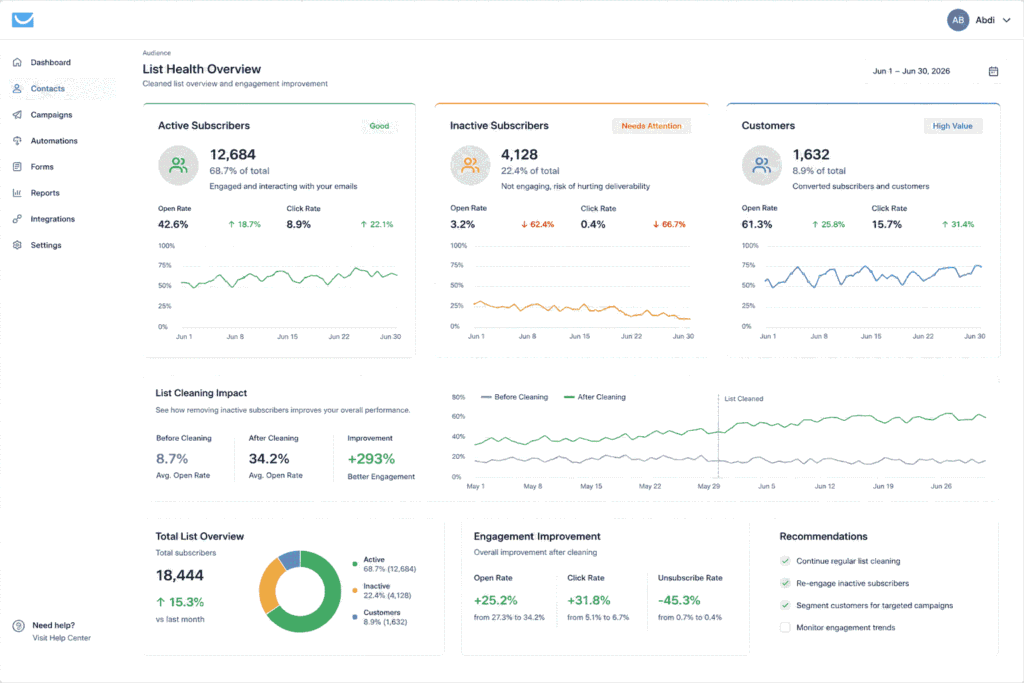
Having a large email list might feel like a success, but a bigger list does not always mean better results. In fact, inactive subscribers, fake email addresses, and people who never engage with your messages can quietly damage your sender reputation and make your Systeme.io emails go to the spam folder.
Email providers like Gmail pay close attention to how people interact with your emails. If you continue sending messages to thousands of subscribers who never open, click, or reply, inbox providers may assume that your emails are not valuable. Over time, this can reduce your email reputation and affect where your future emails are delivered.
Think of your email list like a community. Having 1,000 people who are interested in what you share is much more valuable than having 10,000 people who ignore every message you send.
What to do instead:
Keep your email list healthy by regularly removing inactive subscribers:
- Identify inactive contacts: In Systeme.io, find subscribers who have not opened your recent emails (for example, your last 5–10 campaigns).
- Send a re-engagement email: Before removing them, send a simple message asking if they still want to receive your content.
- Give them an easy choice: Let them confirm they want to stay subscribed or choose to leave.
- Remove or separate inactive subscribers: If someone does not engage after one or two attempts, consider removing them or moving them to a separate inactive segment.
Fix #5: Remove the Spammy Words That Trigger Filters Instantly
The words you use in your emails can affect how inbox providers view your messages. While using one specific word will not automatically send your email to spam, certain phrases, aggressive sales language, and exaggerated promises can make your emails look similar to the patterns used by spam messages.
This is especially important if you are trying to fix Systeme.io emails going to the spam folder. Many beginners focus only on their email design or platform settings, but the actual copy inside their emails can also influence deliverability.
Your goal is not to avoid selling. Your goal is to communicate in a way that feels trustworthy, helpful, and natural.
Common words and patterns to reduce or avoid:
- “100% free” used repeatedly
- “No risk” or unrealistic guarantees
- “Guaranteed income”
- “Get rich fast”
- “Act now or lose this forever”
- Excessive ALL CAPS words
- Too many exclamation marks (!!!)
- Overpromising results that sound unrealistic
For example:
❌ “GET RICH FAST WITH THIS GUARANTEED SYSTEM!!!”
This sounds like a typical spam message because it creates unrealistic expectations.
Instead, write:
✅ “Learn the email strategy that can help you build a stronger subscriber list.”
The second version feels more professional and focuses on value.
Better alternatives to use:
Instead of hype-driven phrases, try:
- “Free resource inside”
- “No purchase needed”
- “Here’s what helped me grow my list”
- “A simple strategy you can try”
- “This might help your side hustle”
- “A step-by-step guide to improve your emails”
Fix #6: Stop Sending Image-Heavy Emails—Use This Simple Text-First Layout
A beautiful email design can grab attention, but adding too many images, banners, and graphics can sometimes hurt your email deliverability. When an email is made up mostly of images with very little text, it can look more like a promotional advertisement than a genuine message from a real person.
This is one reason why some Systeme.io emails go to the spam folder even when the offer is legitimate. Spam filters analyze the overall structure of your email, and image-heavy messages can sometimes resemble the marketing emails commonly used by spammers.
The solution is not to remove images completely. Images can still be useful when they support your message. The key is creating a balanced email that feels personal, provides value, and encourages real engagement.
Use a simple text-first email structure:
1. Start with a short, friendly introduction
Write like you are talking to one person, not broadcasting to thousands.
Example:
“Hey Sarah, I noticed many creators struggle with getting their first email subscribers, so I wanted to share a simple strategy that can help.”
2. Provide clear value before asking for anything
Share something useful:
- A quick tip
- A personal story
- A lesson you learned
- A helpful resource
3. Keep images simple
A good approach:
- Use one or two relevant images maximum.
- Avoid making your entire email one large image.
- Make sure your email still makes sense if images are turned off.
4. Use one clear call-to-action
Instead of adding multiple buttons and links, choose one main action:
- “Read the full guide”
- “Get your free checklist”
- “Join the challenge”
- “Try this strategy”
Fix #7: Cut the Link Clutter—One Clear CTA Beats Ten Confusing Buttons
Adding too many links to your emails might seem like a good way to give subscribers more options, but it can actually hurt your results. When an email contains multiple links, buttons, and different offers, it can look more like a promotional blast than a helpful message.
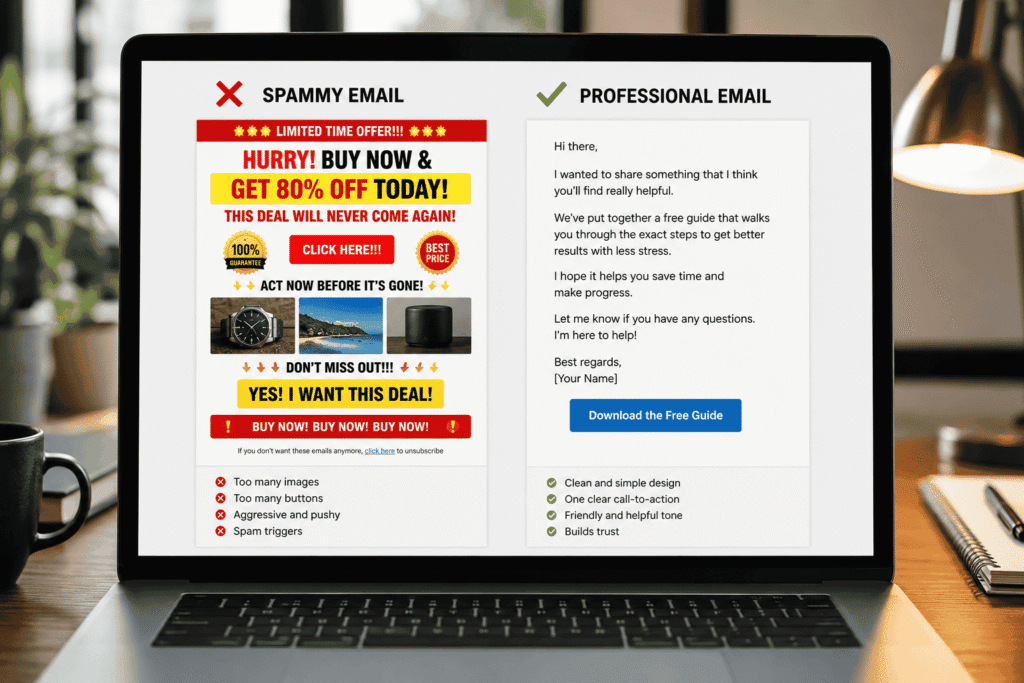
This can affect your Systeme.io email deliverability because spam filters often analyze the overall structure of an email. A message filled with too many links may appear less trustworthy, especially when combined with other warning signs like poor engagement or a new sender reputation.
More importantly, too many links can confuse your subscribers. When people have too many choices, they often take no action at all. A focused email with one clear goal usually performs better than an email trying to promote five different things at once.
Follow this simple rule:
One email = one main action.
Before sending an email, ask yourself:
“What is the one thing I want my subscriber to do after reading this?”
Examples:
- Start here → when introducing a new resource
- Get the guide → when sharing a free download
- Join the free training → when inviting people to an event
- Read the full article → when driving traffic to your website
Best practices for using links:
- Use one primary CTA in your email.
- Keep your links relevant to the topic of the message.
- Use clean, recognizable URLs whenever possible.
- Avoid excessive link shorteners that can look suspicious.
- If you need multiple links, keep them limited and organized.
For example:
❌ “Check my website, follow me on Instagram, join my course, download this, buy this, and read this article.”
This creates confusion.
Instead:
✅ “I created this free guide to help you build your first email list. You can access it here.”
One clear message. One clear action.
Fix #8: Get Subscribers to “Whitelist” You So They Never Miss an Email Again
One simple way to improve your email deliverability is to encourage subscribers to tell their inbox provider that your emails are wanted. When someone adds your email address to their contacts, moves your message from Promotions to their main inbox, or replies to your emails, it creates positive engagement signals.
These actions help Gmail and other email providers understand that you are a trusted sender, not someone sending unwanted messages. This can make a difference when trying to fix Systeme.io emails going to the spam folder, especially if your domain is new or still building a reputation.
The best time to ask subscribers to whitelist your email is right after they join your list. Your welcome email is the perfect opportunity because they have just shown interest in your content.
Add a simple request to your welcome email:
“To make sure you don’t miss future emails, add hello@yourdomain.com to your contacts. If this email appears in your Promotions tab, move it to your main Inbox so you can receive future updates.”
This small reminder helps subscribers take action and improves the chances that your future emails will be delivered properly.
Encourage replies to build engagement
Replies are one of the strongest signs that a real conversation is happening between you and your audience. Instead of ending every email with only a link, ask your subscribers a simple question.
Examples:
- “What is your biggest challenge with email marketing?”
- “Reply and tell me what you are currently working on.”
- “Hit reply and let me know if this tip helped you.”
Even a simple response like “Yes” or “Ready” can create valuable engagement signals.
Fix #9: Write Subject Lines That Scream “Open Me,” Not “Send Me to Spam”
Your subject line is the first thing subscribers see, and it can decide whether they open your email or ignore it. A strong subject line builds curiosity and trust, while a spammy one can hurt engagement and affect your Systeme.io email deliverability.
Keep your subject lines:
- Specific: “Your 5-Day Email Starter Plan is inside”
- Benefit-focused: “How to improve your email open rates”
- Curiosity-driven: “The setup mistake hurting your emails”
Avoid:
- ALL CAPS
- Too many emojis
- Excessive punctuation (!!!)
- Clickbait promises like “YOU WON’T BELIEVE THIS!”
The goal is simple: write like a helpful person, not a spam advertiser. Better subject lines lead to more opens, stronger engagement, and a better chance of keeping your Systeme.io emails out of the spam folder.
Fix #10: Send on a Schedule That Builds Trust, Not Confusion
Sending emails randomly can hurt your engagement. If subscribers hear from you every day for one week and then nothing for months, they may forget who you are or ignore your next message.
A consistent schedule helps build familiarity and trust, which can improve your Systeme.io email deliverability over time.
Better approach:
- Choose a schedule you can maintain (once a week, twice a week, etc.).
- Tell subscribers what to expect.
- Stay consistent for at least 4–6 weeks.
Example:
“Every Tuesday, I’ll send you one simple email marketing tip to help grow your side hustle.”
Consistency creates familiarity. Familiarity creates more opens, clicks, and stronger sender reputation.
Fix #11: Segment Your List So Every Email Feels Personal (Even on Auto-Pilot)
Not every subscriber on your list has the same needs. Some people are just discovering your content, some are ready to buy, and others only want helpful tips.
Sending the same email to everyone can reduce engagement and affect your Systeme.io email deliverability. The better approach is to send more relevant emails to different groups.
Simple segments to create in Systeme.io:
- New subscribers: Joined within the last 30 days.
- Active subscribers: Open or click your recent emails.
- Inactive subscribers: Haven’t engaged for 60+ days.
Send targeted content:
- New subscribers: Welcome emails and quick wins.
- Active subscribers: Advanced tips, guides, and offers.
- Inactive subscribers: Re-engagement emails to bring them back.
When subscribers receive emails that match their interests, they are more likely to open, click, and engage. Better engagement helps build trust with inbox providers and keeps your emails away from spam.
Fix #12: Test, Track, and Tweak Until Your Open Rates Skyrocket
Don’t guess—test.
Before each big send:
- Send a test email to your own Gmail, Outlook, and mobile.
- Check: Does it land in Inbox or Spam? Does it look clean on mobile?
- Review your metrics in Systeme.io:
- Open rate
- Click rate
- Bounce rate
- Spam complaints (if available)
If you see a sudden drop in opens or a spike in bounces, pause and revisit fixes 1–4.
7 Costly Deliverability Mistakes That Keep Side Hustlers Stuck in Spam
Avoid these common traps:
- Buying or importing random email lists.
- Ignoring bounces and spam complaints.
- Sending only promotions, no value.
- Using a free email domain as sender.
- Skipping SPF, DKIM, and DMARC.
- Never cleaning inactive subscribers.
- Blaming Systeme.io instead of fixing setup and strategy.
Fix these, and you’ll see a dramatic difference.
Systeme.io vs Other Tools: Do You Need to Switch—or Just Fix Your Setup?
You might be wondering: “Should I just switch to GetResponse, ConvertKit, or MailerLite?”
If your setup is weak (no domain, no authentication, bad list hygiene), you’ll face the same problem on any tool.
When Systeme.io is enough:
- You’re a beginner or side hustler.
- You want funnels, courses, and email in one place.
- You’re on the free plan or low‑cost plan.
When to consider another tool later:
- You need advanced automation and complex workflows.
- Your list is large and you need more deliverability control.
For most side hustlers, the issue isn’t the tool; it’s how it’s set up.
Free 5‑Day Email Deliverability Starter Plan: Get Out of Spam and Into the Inbox
If you want a simple, done‑with‑you plan to fix this, join the Free 5‑Day Email Deliverability Starter Plan from AbdiGrowthTools.
You’ll get:
- Day 1: Fix your sender setup (domain + authentication).
- Day 2: Clean your list & re‑engage cold subscribers.
- Day 3: Write non‑spammy emails that get opened.
- Day 4: Build a simple nurture sequence.
- Day 5: Send your first “inbox‑friendly” campaign.
This is designed for side hustlers with little time and no tech background—exactly the kind of person who needs this guide.
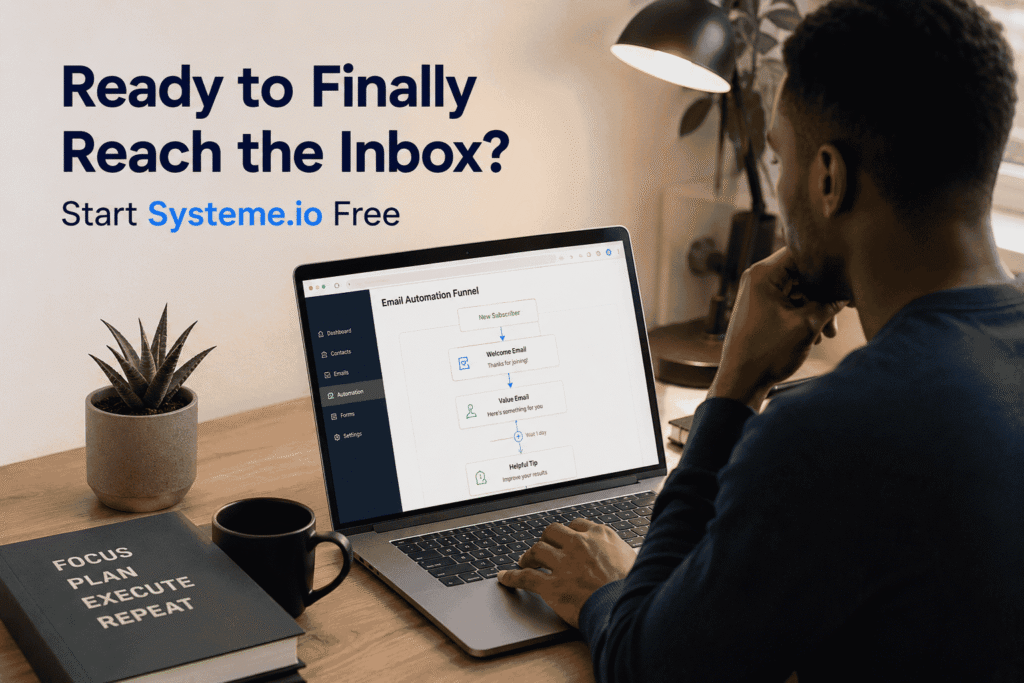
Ready to Finally Reach the Inbox? Start Systeme.io Free and Follow This Exact Setup
If you’re not on Systeme.io yet (or you’re using a free address and messy setup), you can start fresh with a clean configuration.
FAQ: How Long Until Emails Stop Going to Spam? Can You Fix This on the Free Plan? And More
Q1: How long does it take for Systeme.io emails to stop going to spam?
It depends on your list quality and setup, but most side hustlers see clear improvement in 1–3 weeks after implementing fixes 1–4 consistently.
Q2: Can I fix deliverability on the free Systeme.io plan?
Yes. The free plan supports custom domains and the same best practices. Paid plans don’t magically fix bad setup or a poor list.
Q3: Should I create a new Systeme.io account if my current one is “burned”?
Only if you imported bought lists or have extremely high bounce/spam complaint rates. In most cases, cleaning your list, fixing authentication, and warming up properly is enough.
Q4: Do I need another tool if my emails keep going to spam?
Usually no. Most deliverability issues come from setup, content, and list quality. Switching tools without fixing these will just repeat the problem on a new platform.
Q5: Is Systeme.io good for serious email marketing, or just beginners?
Systeme.io is great for beginners and many side hustlers. If you later need very advanced automation, complex tagging, or enterprise‑level control, you might consider tools like GetResponse or ConvertKit down the road
Final Words: Your Emails Belong in the Inbox—Not in Spam
If your Systeme.io emails are going to spam, it doesn’t mean you’re a bad marketer. It means your setup and strategy need a few smart adjustments.
Follow the 12 fixes in this guide, use the checklist, and give it consistent effort for 2–3 weeks. You’ll start seeing:
- Higher open rates.
- More clicks and replies.
- More sales and sign‑ups from your emails.
And that’s how you turn email from a frustrating chore into a reliable income channel for your side hustle.
Your next step:
Pick one—just one—fix from this guide and implement it today. Then come back tomorrow and do the next. Inbox growth is a process, not a magic button.
If you want a guided path, join the Free 5‑Day Email Deliverability Starter Plan and walk through this step‑by‑step with me.
Join the Free 5‑Day Starter Plan
Related posts
No One Opens My Emails” as a Busy Side Hustler (Here’s How to Fix It)
How to Get Email Subscribers Without Paid Ads in 2026
Email Marketing for Side Hustlers: Build a Simple System That Actually Fits Your Schedule
Leave a Reply